Pages

SyntaxHighlighter

Tuesday, January 22, 2013

Multi Server Join using SAS/Access ODBC

It is always best to do most of the processing on a server and only return the filtered results back to the requesting client. In this case I need two columns (state and county) otherwise I might have simply created a macro variable if only a single column were required.

The LIBNAME statement is used to bulk copy (BCP) 8 rows from DEV into the global (##) temp table. Those 8 rows are then joined to an 8 million row table and the entire process takes less than one second.

/* store data into a global (##) temporary table on SQL Server */
libname sqltemp 
  odbc 
  noprompt   = "Driver={SQL Server};Server=devserver;Trusted_Connection=Yes;" 
  bcp        = yes   
  connection = global ;

proc sql ;
  connect to odbc as prod 
    ( "Driver={SQL Server};Server=prodserver;Trusted_Connection=Yes;" ) ;

    /* populate data from prod into a dev SQL Server global temporary table */
    create table sqltemp.'##counties'n as
      select           *
        from           connection to prod
        ( select       *
            from       db.schema.table
            where          statecode  = &state. 
                       and countycode = &county. ) ;
  disconnect from prod ;

  connect to odbc as dev 
    ( "Driver={SQL Server};Server=devserver;Trusted_Connection=Yes;"  ) ;

    create table work.results as
      select            *
        from   connection to dev
        ( select         a.*
            from         db.schema.table a
            inner join   ##counties b        /* SQL Server temp table */
              on             a.state  = b.state
                         and a.county = b.county ) ;
  disconnect from dev ;
quit ;

libname sqltemp clear ;

Friday, December 28, 2012

xtab using proc report and tabulate

Here is an example to transpose data to a cross tab report using proc report and proc tabulate.

data input ;
  do _n_ = 26 to 31 ;
    do year = 2009 to 2012 ;
      date = put( mdy( 12, _n_, 2012 ), yymmdd10. ) ;
      value = round( ranuni( 1 ) * 1000, .01 ) ;
      output ;
    end ;
  end ;
run ;

The below image contains the results of both procedures. The top result is from proc report followed by proc tabulate.

ods listing close ;
ods pdf file = "c:\temp\xtab.pdf" startpage = no style = sasweb ;
 
  proc report data = input nowd ;
    column date year, value ('Daily Total' value = value2) ;
 
    define date   / group  '' ;
    define year   / across  '' ;
    define value  / analysis sum '' format = dollar10.2 ;
    define value2 / analysis sum '' f = dollar10.2 ;
 
    rbreak after / dol skip summarize ;
    compute after ;
      date = 'Total' ;
    endcomp ;
  run ;
 
  proc tabulate data = input ;
    class date year ;
    var   value ;
    table    
          date = '' all = 'Total'
      , ( year = '' all = 'Daily Total' ) * value = '' 
            * sum = '' * f = dollar10.2 ;
  run ;
 
ods pdf close ;
ods listing ;

Thursday, December 20, 2012

ODS TEXT = symbol


This blog post covers how to add a symbol from a font, in this case the up arrow from the Wingdings font.  The symbol I wanted to use was not a unicode character that I could find so I contacted SAS technical support.

If you use the Windows Character Map ( Start | All Programs | Accessories | System Tools | Character Map ), you will see the value as 0xE9.  This can be converted to a numeric value using a hex input format as follows:

value = input( 'E9', hex2. ) ;

An alternative way is to use Microsoft Word, click on the Insert toolbar then Symbols ribbon to open the Symbol dialog box (see below).


Now to render the 233 Wingdings symbol in ODS TEXT= do the following:

ODS TEXT = "^{style[font_face=Wingdings]%sysfunc(byte(233))}" ;

Saturday, November 3, 2012

1 Color in 16.7 million

SAS / Graph and other applications use hexidecimal (base 16 or hex) values for colors. A single hex digit (1/2 an octet) can contain 16 values using 0 thru 9 then A (10) thru F (15). A byte can handle 256 colors (0 to 255 decimal or 00 to FF hex). A red, green, blue (RGB) primary color triplet (24 bit) can handle 16,777,216 colors as can be seen here:

data _null_ ;
  color1 = 16 ** 2 ;
  color3 = color1 ** 3 ;
  put ( color: ) ( @5  = comma10. / ) ;
run ;

    color1=256
    color3=16,777,216

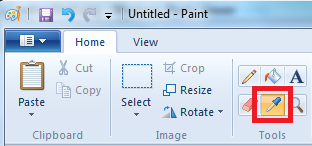
If you need to obtain a specific computer color, you can do that using Microsoft Paint by following these steps:

  1. Press Alt-PrintScreen to capture the screen
  2. Start MS Paint and paste (control-V) the image
  3. Click on the Color picker (eye dropper symbol)
  4. Click on the desired color
  5. Click on Edit Colors to see the decimal values
In this exmaple the returned decimal RGB values are 106, 89, 59. The following SAS macro function will convert the decimal RGB values to a SAS color hex (CX) value.
%macro rgbtohex( r, g, b ) ;
 CX%sysfunc(putn(&r.,hex2.))%sysfunc(putn(&g.,hex2.))%sysfunc(putn(&b.,hex2.))
%mend ;

%put %rgbtohex( 106, 89, 59 ) ;

CX6A593B

Tuesday, October 30, 2012

Bowling for averages

I was recently asked to find the value and name of the column that is closest to the average for a series of columns on a row. Random data was created to emulate the first attempt or roll in the ten frames in bowling.

The below code uses the automatic variable _N_ as a do-loop incrementor and for storing data in array elements. Automatic variables are added to the program data vector (PDV) but not output to a data set. Notice the use of the OF array to calculate the average and the first lowest ordinal value of the difference array (adiff). This was the first time I had occasion to use the vname() function used to identify the name of the column holding the value closest to the average.

data bowling ;
  length name $8 ; *-- make name first column in PDV ;
  array frame[ 10 ] ;
  array adiff[ 10 ] _temporary_ ;

  do name = 'Billy', 'Joe', 'Bob', 'Bubba', 'Junior' ;
    do _n_ = 1 to 10 ;
      *-- create random scores from 0 to 10 ;
      frame[ _n_ ] = floor( ranuni( 1234 ) * 11  ) ;
    end ;    

    average = mean( of frame[ * ] ) ;
    do _n_ = 1 to dim( frame ) ;
      *-- calc absolute difference between scores and average ;
      adiff[ _n_ ] = abs( average - frame[ _n_ ] ) ;
    end ;

    do _n_ = 1 to dim( adiff ) ;
      *-- find the score closest to the average ;
      *-- ordinal() returns smallest difference value from array list ;
      if adiff[ _n_ ] = ordinal( 1, of adiff[ * ] ) then do ;
        frame_value = frame[ _n_ ] ;
        frame_name = vname( frame[ _n_ ] ) ; *-- get column name ;
        leave ; *-- found it so exit the loop ;
      end ;
    end ;   

    output ; 
  end ;
run ;

Remeber this dude/dudettes, SAS abides...

Thursday, October 25, 2012

Make it %local or go loco

Just spent an hour debugging a SAS macro called inside of an outer macro loop and both where using the same macro variable. You should always define macro variables as local within a macro definition. Failure to do so can result in percieved erratic behavior when the outer macro variable value is inadvertantly changed by the inner macro.

Macro parameters are always local by default, but you need to use the %local statement to protect your code. Lesson learned

%macro mymacro( myparam ) ;
  %local myvar ;
%mend ;

Reference: http://support.sas.com/documentation/cdl/en/mcrolref/61885/HTML/default/viewer.htm#a000206835.htm

Thursday, October 11, 2012

Controlling SAS/AF Frame Columns

I needed a SAS/AF frame to edit a Base SAS data set. The SAS data set contained six columns and I only wanted to expose the first three to the users. I also noticed on my first attempt that user edits were automatically being converted to uppercase even though there were no settings assignend to the data set's format or informat.

The solution to display the columns was to use an SCL list and assign the list to the SAS data set model's columnorder property. To prevent edits going to uppercase, the columns object uppercase property needed to be set to 'No'.

init:
   mdldata.editmode = 'tableleveledit' ; 
return ;

process:
  dcl list collist ;
  collist = { 'start', 'end', 'label' } ;
  mdldata.columnorder = collist ;

  do i = 1 to 3 ;
    /* allow data to be entered in mixed case */
    /* http://support.sas.com/kb/3/925.html   */
    mdldata.columns(i).uppercase = 'No' ;
  end ;
  tblviewer._refresh() ;
return ;