Pages

SyntaxHighlighter

Saturday, April 9, 2016

Remove CRLF inside Double Quotes

Have you ever encountered a carriage return (CR) or line feed (LF) character inside of double quotes in a comma separated values (CSV) file? As soon as SAS sees either of these characters it interprets it as the end of line and will read the rest of the line as the next line.

If you run the sample file created below and open it in an editor such as NotePad++ you can see the offending character by clicking on the "Show All Characters" button.

%let fname = c:\temp\test.csv ;

/* Create sample CSV file with LF inside of double quotes */
data _null_ ;
  file "&fname." ;
  /* byte(10) is a line feed (LF) same as '0A'x */
   x = cat( '"All Good"', ',"Line ', byte( 10 ), ' Feed"'   ) ;
   put "Column1, Column2" ;
   put x ;
run ;


data test1 ;
  infile "&fname." dsd truncover firstobs = 2 ;
  input  col1 : $16. col2 : $16. ;
run ;

The below macro was written based on this SAS tech support entry. Sharedbuffers are used to read and write to the same file. Instead of reading the entire line all at once, it reads the data one byte at a time as a binary stream using the recfm = n option. The code uses the logical NOT operator (^) to toggle the value (from true to false or vice versa) when finding the first and next double quote to determine when to convert a CR or LF character to a blank. This technique limits the removal of CRLF characters to only those that occur inside of double quotes and not the true end of line.

%macro removeQuotedCRLF( filename = ) ;
  %if not %sysfunc( fileexist( "&filename." ) ) %then %do ;
    %put %str(E)RROR: The file: &filename was not found. ;
    %return ;
  %end ;

  data _null_ ;
    infile "&filename." recfm = n sharebuffers ;
    file "&filename." recfm = n ;
               
    retain opendoublequote 0 ;
    input byte $char1. ;

    if byte = '"' then opendoublequote = ^( opendoublequote ) ;
    if opendoublequote then do ;
           if byte = '0D'x then put " " ;  /* CR */
      else if byte = '0A'x then put " " ;  /* LF */
    end ;
  run ;
%mend ;

%removeQuotedCRLF( filename = &fname. )

data test2 ;
  infile "&fname." dsd truncover firstobs = 2 ;
  input  col1 : $16. col2 : $16. ;
run ;

Sunday, December 13, 2015

Parsing Multivalued columns using MOD function

One of the tenets of first normal form database design is to only allow atomic values in a column. However, that is not always the case in the real world.

I recently encountered a multi-valued column on a project and instead of writing a bunch of OR and SUBSTR(right of =) functions, I saw a pattern and used the FIND() [CHARINDEX() in SQL Server] and MOD() [% in SQL Server] functions. The use of the FIND() and MOD() functions was not only easier to maintain (less lines of code) but ran about twice as fast.

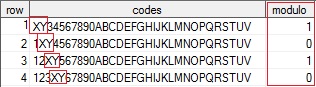
The below code emulates a multi-valued column populated via the SUBSTR(left of) to stuff the 'XY' values in the multi-valued column. The requirement is to find the value 'XY' only on an odd numbered positions (e.g. 1, 3, 5, etc). The FIND() function returns the starting point of the searched string and then the MOD function is used to determine if that position is an odd or even starting location. Modulo finds the remainder after division of one number by another. From Wikipedia:

Given two positive numbers, a (the dividend) and n (the divisor), a modulo n (abbreviated as a mod n) is the remainder of the Euclidean division of a by n. For instance, the expression "5 mod 2" would evaluate to 1 because 5 divided by 2 leaves a quotient of 2 and a remainder of 1, while "9 mod 3" would evaluate to 0 because the division of 9 by 3 has a quotient of 3 and leaves a remainder of 0; there is nothing to subtract from 9 after multiplying 3 times 3.

In order to really see the performance differences in these approaches, I wrote a macro to create a million row SAS data set. After that, the two techniques were bench-marked. The FIND()/MOD() technique took 0.35 seconds vs 0.68 seconds using OR and SUBSTR().

data test( keep = row codes ) ; length row 3 codes $32 ; do row = 1 to 31 ; codes = '1234567890ABCDEFGHIJKLMNOPQRSTUV'; substr( codes, row, 2 ) = 'XY' ; output ; end ; run ; %macro loopdata ; %local setnotes loopdataset ; %let setnotes = %sysfunc( getoption( notes ) ) ; %let loopdataset = %sysfunc(ceil( %sysevalf( 1000000 / 31 ) ) ) ; options nonotes ; /* turn off notes to the SAS log */ data testlarge ; set /* create a millon row data set */ %do i = 1 %to &loopdataset. ; test %end ; ; run ; options &setnotes ; /* reset NOTES to previous value */ %mend ; %loopdata proc sql stimer ; create table sqlmod as select row , codes , case when mod( find( codes, 'XY', 'i' ), 2 ) then 1 else 0 end as modulo from testlarge ; create table sqlsubstr as select row , codes , case when substr( codes, 1, 2 ) = 'XY' or substr( codes, 3, 2 ) = 'XY' or substr( codes, 5, 2 ) = 'XY' or substr( codes, 7, 2 ) = 'XY' or substr( codes, 9, 2 ) = 'XY' or substr( codes, 11, 2 ) = 'XY' or substr( codes, 13, 2 ) = 'XY' or substr( codes, 15, 2 ) = 'XY' or substr( codes, 17, 2 ) = 'XY' or substr( codes, 19, 2 ) = 'XY' or substr( codes, 21, 2 ) = 'XY' or substr( codes, 23, 2 ) = 'XY' or substr( codes, 25, 2 ) = 'XY' or substr( codes, 27, 2 ) = 'XY' or substr( codes, 29, 2 ) = 'XY' or substr( codes, 31, 2 ) = 'XY' then 1 else 0 end as modulo from testlarge ; quit ;

Monday, November 16, 2015

Full width title underline

SAS ODS styles provide opportunities to enhance the appearance of reports. To do this it is required to set an ODS escapechar to establish the inline formatting symbol. I like to use the tilde (~) symbol as in ODS escapechar = "~" ;.

Once the escapechar has been established, use it to set style properties using this syntax "~{style[ property = value ]text to display}" ;.

If you want to have a centered title with a thin red line underneath it spanning the full width of the page, use the width = 100% value (outputwidth= can also be used). The first example below uses the default width= value and is not what was desired. The second attempt works as expected.

options nodate nonumber ;
ods listing close ;
ods escapechar = "~" ;

ods pdf file = "c:\temp\partialline.pdf" ;
  title j = c "~{style[ borderbottmcolor = red 
                        borderbottomwidth = 0.5pt 
                        color = black]SASHELP.CLASS Report}" ;
  proc report data = sashelp.class( obs = 2 ) ;
  run ;
ods pdf close ;

ods pdf file = "c:\temp\fullline.pdf" ; title j = c "~{style[ borderbottmcolor = red borderbottomwidth = 0.5pt width = 100% color = black]SASHELP.CLASS Report}" ; proc report data = sashelp.class( obs = 2 ) ; run ; ods pdf close ;
ods listing ; UPDATE: 21Dec2015 - from SAS Tech support to create horizontal line across page in ODS PDF: ODS PDF TEXT = "~{style[ borderbottomcolor = red borderbottomwidth = 0.5pt width = 100%] }" ;

Thursday, September 3, 2015

dropColumns Macro

Sometimes you want to remove cluttered columns (i.e. columns where all rows have the same value) from a SAS data set and that is just what the below %dropColumns macro does. Back in 2012 I create a blog post, Drop Missing Columns that handled the removal of NULL values found in either character or numeric columns.

This macro is different in that it handles a single data type at a time, but supports both NULL as well as a fixed value passed as a parameter. So if the following parameters were used, the columns in red below will be removed. The notes in the SAS log that follow will inform you as to what transpired.

    %dropColumns( dsn=x, value=997, type = C )
  NOTE: Dropped 2 of 4 character columns containing "997" from x in 0.040 seconds.
  NOTE: Dropped columns: char1 char2
/**************************************************************************
*     Program: dropColumns.sas
*      Author: Tom Bellmer
*     Created: 03SEP2015 
*     Purpose: drop columns that have the same value in every row.
*       Usage: %dropcolumns( dsn=mydsn, value = 997, type = C )
*       Notes: Use value=, type=C or value=., type=N for NULLs
**************************************************************************/

%macro dropColumns( 
    dsn   =
  , value =
  , type  = C 
) ;

  %local lib mem varlist starttime droplist dropcount ;

  %if not %sysfunc( exist( &dsn. ) ) %then %do ;
    %put %str(E)RROR: The data set &dsn does not exist. ;
    %return ;
  %end ;

  %let type = %upcase( &type. ) ;
  %if &type ne C and &type. ne N %then %do ;
    %put %str(E)RROR: Invalid type = &type. ;
    %return ;
  %end ;

  %let starttime = %sysfunc( datetime() ) ;
  proc sql noprint ;
    %if %index( &dsn., . ) > 0 %then %do ;
      %let lib = %upcase( %scan( &dsn., 1 ) ) ;
      %let mem = %upcase( %scan( &dsn., 2 ) ) ;
    %end ;
    %else %do ;
      %let lib = WORK ;
      %let mem = %upcase( &dsn. ) ;
    %end ;
    select    name
      into    :varlist separated by ' ' 
      from    dictionary.columns
      where       libname = "&lib."
              and memname = "&mem." 
              and type    = ifc( "&type." = "C", "char", "num" ) ;
  quit ;

  %let type = %sysfunc( ifc( &type. = C, $, ) ) ;
  %if &type. = $ %then %let value = %sysfunc( quote( &value. ) ) ;

  data _null_  ;
    length droplist $32767 ;
    set &dsn. end = eof ;

    %if &sqlobs. > 0 %then %do ;
      array avars( * ) &type. &varlist. ;
      array adropvars ( &sqlobs. ) $1 _temporary_ ( &sqlobs. * 'Y' ) ;
      do i = 1 to &sqlobs. ;
        if avars( i ) ne &value. then adropvars( i ) = 'N' ;
      end ;

      if eof then do ;
        do i = 1 to &sqlobs. ;
          if adropvars( i ) = 'Y' then do ;
            dropcount + 1 ;
            droplist = catx( " ", droplist, vname( avars( i ) ) ) ;
          end ;
        end ;
      end ;

      call symputx( 'droplist', droplist, 'l' ) ;
      call symputx( 'dropcount', dropcount, 'l' ) ;
    %end ;
  run ;

  %if %symexist( dropcount )  %then %do ;
    data &dsn ;
      set &dsn( drop = &droplist ) ;
    run ;

    %put NOTE: Dropped &dropcount of %sysfunc( countw( &varlist. ) ) %sysfunc(ifc(&type=$,character,numeric)) columns containing &value. from &dsn. in %sysfunc( strip( %sysfunc( putn( %sysevalf( %sysfunc( datetime()) - &starttime.),9.3) ) ) ) seconds. ;
    %if &dropcount > 0 %then %do ;
      %put NOTE: Dropped columns: &droplist. ;
    %end ;
  %end ;
  %else %do ;
    %put NOTE: no columns were dropped. ;
  %end ;
%mend ;

/* EOF: dropColumns.sas  */

Sunday, August 30, 2015

Column Splitter Take 2 - Merge

An anonymous person provided an alternative take on my %columnSplitter macro and I have to admit this one is easier to understand, has less code and runs about twice as fast. Congrats to whomever shared this alternative approach.

Here is the complete code using the merge statement:

%macro columnSplitter2( 
    columns = 3
  , indsn   =
  , outdsn  =
  , varname =  
) ;
 
  %local dsid nobs increment ;

  %if not %sysfunc( exist( &indsn. ) ) %then %do ;
    %put %str(E)RROR: invalid input data set name: &indsn. ;
    %return ;
  %end ;

  %if %isblank( &indsn. ) %then %do ;
    %put %str(E)RROR: invalid output data set name: &outdsn. ;
    %return ;
  %end ;

  %if %isblank( &varname. ) %then %do ;
    %put %str(E)RROR: invalid variable name: &varname. ;
    %return ;
  %end ;

  %let dsid      = %sysfunc( open( &indsn. ) ) ;
  %let nobs      = %sysfunc( attrn( &dsid., nobs ) ) ;
  %let dsid      = %sysfunc( close( &dsid. ) ) ;
  %let increment = %sysfunc( ceil( &nobs. / &columns. ) ) ;

  data &outdsn. ;
    merge
    %do i = 1 %to &columns ;
      &indsn( 
        keep     = &varname 
        rename   = ( &varname = &varname&i ) 
        firstobs = %eval( ( &i. - 1 ) * &increment. + 1 ) 
        obs      = %eval( &i. * &increment. ) )
    %end ;
    ;
  run ;

%mend ;

%columnSplitter2(columns=3,indsn=states,outdsn=statessplit3,varname=statename)

Friday, August 21, 2015

Column Splitter

I created a report that includes a one page table of contents. Having a single column of all 50 states runs off the page, so I wanted to create additional columns to spread the data horizontally. The %columnSplitter() macro was created to support this capability.

In the below code, several SAS Component Language (SCL) functions are used to process the data. The OPEN() function supports reading data sets in random access instead of sequential access mode. The dsid variable is a pointer to the data set and can be used with many other functions to determine data types, length and number of rows. The %isblank macro code can be found here.

An ARRAY is used to assign the number of columns to create. That value must be determined at compile time, hence the need for the DATA _NULL_ step prior to the assignment of the array subscript. The offset variable is the result by dividing the total number of logical rows by the desired number of columns. The key to the program is the use of the FETCHOBS() function to read a specified row number.

Based on the data type of the &varname variable, a getvarc()/getvarn() function is used to obtain the value of that row. After data for all columns is collected and output, the call missing( of colname[*] ) function is used to reset all array elements to missing. Finally, what gets opened must be closed using the CLOSE() function.

data states ;
  do statecode = 1 to 56 ;
    statename = fipnamel( statecode ) ;
    if statename not in ('Invalid Code', 'District of Columbia' ) then output ;
  end ;
run ;

%macro columnSplitter( 
    columns = 3
  , indsn   =
  , outdsn  =
  , varname =  
) ;

  %local length vartype varnum i j k ;

  %if not %sysfunc( exist( &indsn. ) ) %then %do ;
    %put %str(E)RROR: invalid input data set name: &indsn. ;
    %return ;
  %end ;

  %if %isblank( &indsn. ) %then %do ;
    %put %str(E)RROR: invalid output data set name: &outdsn. ;
    %return ;
  %end ;

  %if %isblank( &varname. ) %then %do ;
    %put %str(E)RROR: invalid variable name: &varname. ;
    %return ;
  %end ;

  data _null_ ;
    dsid = open( "&indsn." ) ;
    varnum = varnum( dsid, "&varname." ) ;
    call symputx( 'varnum', varnum ) ;
    vartype = vartype( dsid, varnum ) ;
    call symputx( 'vartype', vartype ) ;
    call symputx('length',cats(ifc(vartype='C','$',''),varlen(dsid,varnum)));
    dsid = close( dsid ) ;
  run ;

  data &outdsn. ( keep = colname: ) ; 
    array colname[ &columns. ] &length. ; 
    dsid = open( "&indsn." ) ;
    totalobs = attrn( dsid, 'nlobs' ) ;
    offset = ceil( totalobs / &columns. ) ;
    do i = 1 to offset ;
      k = 1 ;
      do j = 0 by offset while( k <= &columns. ) ;
        rc = fetchobs( dsid, i + j ) ;
        if ( i + j ) <= totalobs then do ;
          if "&vartype." = "C" then colname[k] = getvarc(dsid, &varnum.) ;
          else colname[ k ] = getvarn( dsid, &varnum. ) ;
        end ;
        k + 1 ;
      end ;
      output ;
      call missing( of colname[ * ] ) ;
    end ;

    dsid = close( dsid ) ;
    stop ;
  run ;
%mend ;

%columnSplitter(columns=3,indsn=states,outdsn=statessplit3,varname=statename)
%columnSplitter(columns=4,indsn=states,outdsn=statessplit4,varname=statename)

Saturday, July 25, 2015

The Tooth about Tobacco

If after reading Robert Allison's and Rick Wicklin's SAS blog posts on toothlessness you're saying "Yeah baby!, Yeah!" I want to read more, then you have come to the right place.

No one wants to lose their teeth, yet there is good chance this will happen to many people once they become senior citizens. One of the things in Rick's post was a correlation between median income in a state and the number of edentulous individuals. When I ran a proc corr against the data he provided, the relationship was -0.63442. Not bad, but I wondered if other variables were more highly correlated to toothlessness.

I wondered if instead of income, Body Mass Indicator or BMI might be more highly correlated to one losing teeth. Sure enough, as the below code and graph reveals, the correlation increased to 0.73565 using BMI as a variable.

data teethcig ;
  merge teeth cigs ;
  by state ;
run ;

proc corr 
  data = teethbmi 
  noprint 
  outp = opbmi( where = ( _type_ = 'CORR' and _name_ = 'BMI' ) )  ;
  var bmi pct ;
run ;

data _null_ ;
  set opbmi ;
  call symputx( 'BMICORR', put( pct, 8.5 ) ) ;
run ;

title "All Teeth Extracted vs. BMI";
footnote j = l "Source: http://www.cdc.gov/obesity/data/table-adults.html" ;
proc sgplot data = teethbmi ;
  scatter x = bmi y = pct / datalabel = state ;
  loess   x = bmi y = pct ;
  refline 18.5 / 
    axis = x 
    label = "Normal (18.5 - 24.99)"   
    lineattrs = ( color = red ) ;
  refline 25 / 
    axis = x 
    label = "Overweight (25 - 29.99)" 
    lineattrs = ( color = red ) ;
  refline 30 / 
    axis = x 
    label = "Obese (over 30)" 
    lineattrs = ( color = red ) ;
  xaxis values = ( 17.5 to 37.5 by 2.5 ) ;
  inset "Correlation Coefficient = &bmicorr" / 
    border 
    title = "Pearson" 
    position = bottomright ;
run ;

After looking at the output, I started to wonder if another variable such as tobacco usage might be more highly correlated to tooth loss than BMI. I was surprised to discover that the overall median adult cigarette smoking prevalence across states was 21.2% in 2011 using data provided by the Center for Disease Control or CDC. When cigarette smoking was correlated to toothlessness by state, the pearson correlation coefficient increased to 0.77286 as can be seen in the next graph.

Taking into consideration the usual caveat that correlation does not imply causation, if you want to retain your teeth it is likely best to avoid smoking, eat well, make more money and brush those chompers...

The full source code can be found here.